Two lenses. Two projections. One fixture, one bracket, one power run.
The Infinity Dual Lens Projector carries two independent lenses in a single housing, each with its own gobo, projecting at the same time. That means you can layer a moving background effect behind a crisp static logo, throw two different marks onto two different surfaces, or cover twice the area — without buying, mounting, wiring and aiming a second projector.
60W to 300W, from $880.80, indoor or outdoor, with two free full-color custom gobos — one for each lens.
Three quite different jobs, all from the same fixture:
The commercial case is simple: a second projector means a second bracket, a second power run, a second aim to survey, and a second fixture to service at height. This is one of each.
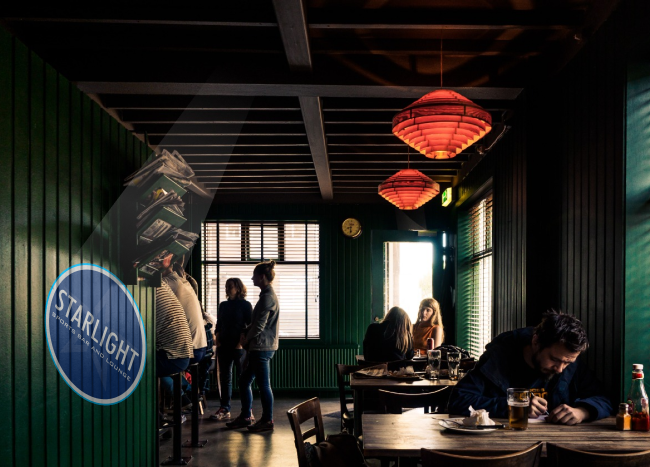
A logo projected onto a plain wall reads as signage. The same logo sitting on top of slow-moving water ripple, cloud or pattern reads as a designed environment — and people stop and look at it. It is the difference between marking a space and dressing one.
Practically: run the effect on the wider lens so it fills the surface, and the logo on the tighter lens so it stays sharp and readable within it. Tell us what you want on each lens and we will pair them for you before the order goes in.
Lens number × distance = image width, calculated separately for each lens. The standard 1:0.33 gives a 3.3 ft projection from 10 ft away (a 3.0:1 throw ratio). Because you are specifying two lenses, you can deliberately mismatch them — and for the layered look you usually should.
A worked pairing: at 20 ft, a 1:1.0 lens projects a 20 ft background and a 1:0.33 projects a 6.6 ft logo inside it. That ratio — a wide bed with a tight mark on top — is what the layered effect depends on.
Aim within about 30 degrees of perpendicular to the surface. Beyond that a circle turns into an egg and lettering leans.
This matters more here than on a single-lens fixture, because both projections inherit the same mounting angle. Get it wrong and you have not distorted one image, you have distorted the background and the logo sitting on it — and a leaning logo on top of a leaning effect is very visible. Survey the angle once, properly, and both lenses benefit. Where the position is fixed for you, keystone correction squares things back up.
Wattage answers the light already on the surface. The lens sets the size. And on this fixture there is one extra consideration worth knowing before you choose.
Two projections ask more of the fixture than one. If you are running both lenses hard — a full-width background plus a logo, on a lit surface — specify above what a single-lens projector would need for the same wall. Run your distance, size and light level through the Wattage Finder and tell us you are specifying a Dual Lens, and we will adjust it for you.
Every Dual Lens ships with two custom full-color gobos, free — one for each lens, which is exactly what the fixture needs to do its job on day one. Send a logo file, a sign file or a photo of existing signage; our team prepares the artwork at no charge and sends a proof before anything is cut. Order more any time, or pick a background from the stock collection — effects and patterns are usually where the second lens ends up.
Standard gobos are 37 mm. Certain effect slides use a larger 80 mm format — if you want one of those on the background lens, ask us and we will confirm it fits your configuration before you order.
The layered look is where this fixture earns its price, and the best versions are not subtle corporate ones. Put drifting cloud behind a hotel crest so the whole wall breathes. Run water ripple under a restaurant name so the surface never sits still. Project a seasonal texture behind a logo that never changes — then change only the texture four times a year, from one gobo swap on one lens.
The Dual Lens is specified for both indoor and outdoor installation and built for 8–10 hours a day of commercial running. Facades, covered entrances and interiors are all in scope.
Freight is included free to just about anywhere in the world. Tell us what you want on each lens, the surface and the mounting distance, and we will pair the two lenses and the wattage for you through the quote form. Mix Match & Save covers multi-unit orders.
One housing with two independent lenses, each carrying its own gobo and projecting at the same time. It does something a single-lens projector simply cannot: put two images up at once — most often a moving background effect with a crisp static logo layered on top of it.
Yes. Every unit is manufactured with a wide-voltage input of 110–240V AC, so it runs on standard US 120V mains straight out of the box — and on 220–240V anywhere else without a converter.
Yes. Each lens takes its own gobo, so you can run a logo and a pattern, two different logos, or a message and an arrow — and aim them at two different surfaces if you want.
A moving background on one lens and a logo held perfectly still on the other. The mark sits on top of the movement instead of competing with it, and it turns a wall from signage into a designed environment.
Usually not. For the layered look you want a wide lens for the background and a tighter one for the logo — at 20 ft, a 1:1.0 projects a 20 ft bed and a 1:0.33 puts a 6.6 ft mark inside it.
Two, free, in full color and made from your artwork — one for each lens, which is what the fixture needs to work properly from day one.
37 mm as standard. Certain effect slides use a larger 80 mm format — if you want one of those on the background lens, ask us to confirm it against your configuration before ordering.
Usually, and the hardware price is only part of it. Two projectors means two brackets, two power runs, two aims to survey and two fixtures to reach when something needs attention. This is one of each.
Judge the light already on the surface, then allow for the fact that two projections ask more of the fixture than one. 60W for dark interiors, 100–160W for typical lit commercial work, 200–300W for bright surroundings and large surfaces. Tell the Wattage Finder your throw and light level, and tell us you are specifying a Dual Lens.
Within about 30 degrees of perpendicular. It matters more here because both projections inherit the same angle — get it wrong and you have distorted the background and the logo sitting on it.
Yes — it is specified for both indoor and outdoor installation and runs from −20°C to 60°C (−4°F to 140°F).
1–2 weeks including your two custom gobos, shipped free worldwide.
Every business has one wall it treats as a backdrop. Two lenses turn that wall into a composition — something moving, with your name held steady on top of it — and none of it is attached to the building. Join The Projection Revolution ∞
Source: Infinity Projectors manufacturer specification sheet. Recommended daily duty cycle is not separately spec\'d by the manufacturer for this line — the LED engine is rated for continuous operation over its listed life.
A multi-lens projector allows you to load multiple gobo slides at once (4, 6, or 8), so you can rotate between different logos or messages without needing to take the projector down each time.
Use them when you want to tell a story, rotate between seasonal promotions, or alternate between logos and taglines. They are also effective in retail and hospitality where frequent updates keep the experience fresh.
Walls and floors are most popular. Multi-lens units are often used in retail stores, lobbies, and event venues where constant variety is important.
Yes, depending on the model. Some multi-lens projectors support lens upgrades such as 1:0.4, 1:0.65, or 1:1 ratios. Check the product page for details on compatibility.
Yes. Projectors are popular for weddings, projecting monograms or romantic designs. Multi-lens units can rotate between multiple wedding logos or themes.
Accessories include upgraded cords, extra remotes, mounting hardware, and protective enclosures for outdoor setups.
Give Rating
Your Review
Drag and drop your media files here, or click to upload — up to 5 files, 50MB each
Company Name (optional)
Your Name
Your Email
Not published — we only use it to confirm your order and reply to you.